Tuesday, April 25, 2017

Aggregate Pages and Their Application for Teachers/Entrepreneurs

What are aggregate sites?

By and large, aggregate sites are web pages designed to collect large amounts of data in small, understandable ways. These sites may use widgets or other RSS feed tools to track information/text from the moment of its publication. They are often used in website building and marketing as a form of content aggregation or means to encourage traffic/backlinking/SEO optimization in Google Analytics.


However, as the author of To Make A Website says,

While there are several great ones...there are also plenty of spam content aggregating websites that you shouldn’t want any part of.        --Matt Clark, 2015 
This week I explored two legitimate sites for content aggregation: Netvibes and Protopage.

Features:

Netvibes

  • track sources
  • track topics
  • notification options integrated into Windows
  • public dashboard settings
  • ability to create multiple dashboards--presumably for both individual (as with Tweetdeck) and public (as in Wix or Wordpress) use


Protopage

  • track topics via RSS feeds
  • NO notification options integrated into Win7, Win8, Win10, Linux, or MAC but notification options can be adjusted via Chrome
  • public & private dashboard settings
  • ability to create multiple dashboards
  • organizational widgets
  • tools for site optimization and naming

Applications for Teachers:

  • track personal and professional data (social media sites, work & personal emails, news sources, field-related topics, personal interests, etc).
  • create a platform through which students can learn more about organizations or specific subjects
  • create to-do lists students can modify

Business Applications:

  • backlinking
  • traffic generation
  • SEO optimization
  • overall improved Google analytics scores


Overall Takeaway:
For Netvibes, it is not clear what is displayed, when, and with what security/audience options in place for features like facebook, twitter, Instagram, etc. that may also be associated with the account user.
For my public dashboard, I could also NOT resolve the issue that all that displayed was the loading symbol [Loading...], see image below or this live link: 


Initially, I ran into a slight resistance with Protopages as the site:


  • appeared to be lacking aesthetically when compared to Netvibes and 
  • was down for maintenance the first instance I attempted to access it (see image below).


However, as you can see HERE I was able to get my site up and running with a few widgets. Unfortunately, there are still a few minor bugs surrounding the "delete widget" button--but you can get around this by editing an empty widget box to reflect the RSS origin or another more viable site.

Overall, if you're a teacher who doesn't need to have high analytics scores and/or already has a dedicated system in place for contacting students I recommend simply using a custom desktop skin to organize all of your personal, professional, and system information. Although the overall process of using widgets effectively and securely may be a steep learning curve for some, I have used Rainmeter (Windows 7 and up) in the past with a high level of success. You can create a fully custom and aesthetically astounding desktop experience that directly follows these same RSS streams as (sometimes untrustworthy) aggregate sites using this platform (if you also use Windows), GeekTool (for macOS), or Conky (for Linux). For more information, I highly recommend following r/Rainmeter on Reddit and following their tutorial tips. Happy organizing! 

Saturday, April 15, 2017

How to Incorporate Live Streaming, Twitter, & YouTube into Your Classroom


The Basics:

YouTube LIVE is a function of the YouTube platform that allows channel hosts to live-stream their videos either publicly or privately. This feature was likely created to compete with the live-streaming service Twitch (see also: YouTube Gaming). Although this function can at first be difficult to implement if you do not have experience with broadcasting software, there are endless instructional videos available for review on the primary YouTube platform. From my experience, most people can learn all the skills they need to successfully host streams within less than 48hrs. YouTube reliability depends heavily on your regional internet access and speed, however, the primary site itself is always available. As far as I have experienced in the past, the only external links YouTube (YT) generates are for site monetization. However, users themselves are free to link to any external site they wish (as long as it follows YT content guidelines). In 2013, YouTube received a “technical Emmy” from the National Academy of Arts & Sciences for its video recommendation algorithms; however, the corporation has yet to receive any educational awards that I’m aware of.

Twitter, much like Facebook (FB), is a social media platform. However, unlike other applications, it offers the ability to communicate with global users, corporations, and organizations that otherwise, a singular user may not ordinarily have contact with. Moreover, while you may only receive occasional updates from your FB profile, Twitter offers the opportunity for constant and instantaneous communication between parties in a live format.
Existing Demographics:
Despite Donald Trump’s proclivity to use Twitter, this site is surprisingly unique in that many of the most vocal users belong to minority groups (see: black twitter).twitteruser_RACE.jpg
Moreover, the primary group engaging on Twitter are of the same age as high school and college attendees (12-34 yr old).
twitterVSfacebook_AGE.jpg
According to archived Neilsen Reports and writers like PiperJaffray (author of The User Revolution)
the demographics for YouTube are situated within this same age range. However, YouTube's users more closely mirror the overall online population (with 87% of users identifying as non-Hispanic Caucasians).

Classroom Application:
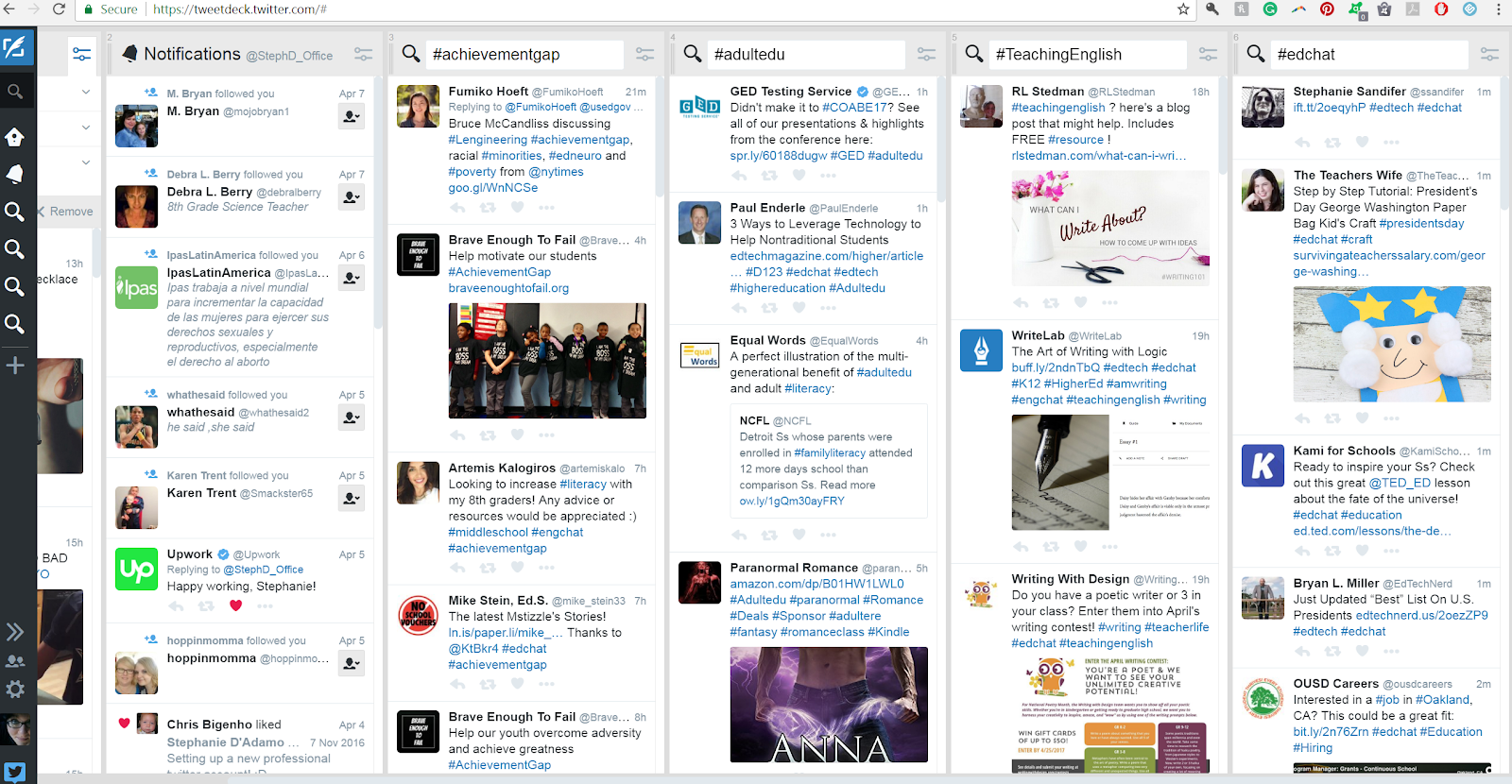
By using both Twitter and YouTube simultaneously, teachers can encourage cross-cultural communication between various ethnicities that may not typically expose themselves to one another. Twitter can be used not only to update students on live classroom (or lecture) streams, but continues to offer surprising new educational discussions, techniques, and communities held together largely by specific hashtags. Teachers can follow along with multiple live hashtags by using various services like TweetDeck. Here’s an example of what my personal TweetDeck looked like earlier today.

tweetdeck_setup.png


I used the YouTube format to host a trial stream on academic discussion covering topics like Youtube, Open Broadcaster Software (OBS), and Elian for ESL learners & speakers. You can watch my work on my channel here. By integrating multiple web 2.0 software strategies, it is my belief that we have the opportunity now, more than ever, to connect with our students in meaningful, intuitive, and organic ways.

Sunday, April 2, 2017

How Being Vain Could Save Your Job: The "Vanity Search"

Up until now, my posts have focused solely on how web technologies can positively affect your students, your classrooms, and your content. But how can web technologies help teachers and students as individuals?

Since roughly 5 years ago, I started hearing about the horrors of "googling yourself". 
Today, our president wields Twitter like a weapon of the Armed Forces. 
Your digital footprint is your new resume.


Read CNN's article "Donald Trump is giving a master class in how to use Twitter" here.

I've participated with countless digital corporations within the past few months alone. LinkedIn, Google+, UpWork, AirBnB, Tutor.com, Wordpress, Blogger, Etsy, Mechanical Turk (Amazon), YouTube, Twitch, eBay, Amazon.com: the list goes on. The list of employers who function within the rapidly growing e-commerce sector is rising exponentially. Even "stone and mason" businesses like WalMart are scrambling for a way to monetize their online presence. In this widening world of digital citizenship, every hiring manager who was once promised fame as a 90's kid is looking for a micro-celebrity. That's right. With 250 friends you can suggest a lot of products. You can become a local spokesperson. The problem is: those of us who have been employed with the same company for over 5 years, those who are just entering the workforce, and those interested in applying to prestigious schools may still be using these social media outlets for solely entertainment purposes without recognizing their level of public engagement.


The Internet Society answers "What is a Digital Footprint?"


Since I'm looking to expand my employment opportunities as I carry myself through graduate school (and only recently left a company at which I spent over 7 years) I decided it was time to do an in-depth look into my web presence. This meant googling my name, checking my profiles as they appear to others, and attempting to locate every account I've created linked to my personal and professional (opposed to purposely anonymous) accounts. 


Rather anticlimactically, when I egogoogled, there wasn't much to be found. And what was found was fragmented. I have a terrible habit of forming multiple accounts for multiple sections of life (i.e: facebook settings to separate coworkers, family, and friends; a separate email for personal and professional communications; etc). Moreover, and rather unexpectedly, I see more people who aren't me showing up when I search my relatively "unique" name. This does not necessarily mean that I'm producing less "content" than other people with my same name, but it does likely mean that I have not optimized the sites that I do engage on so that potential employers see the most qualified version of my "digital self".

Lucky for you, over the course of the next several weeks, I will be discussing the steps I undertake to solidify my online reputation, expose myself to new business opportunities, and cultivate my digital footprint.


Thursday, December 8, 2016

More than Pen and Paper: 5 Word Processors You've Never Heard Of

Typically,  writers use one standard word processor (Pages, Microsoft Word, or Open Office--depending on their brand allegiance) to write their essays, poems, and first drafts. However, educational technology tools have come farther than you might imagine. Many of us might have heard of Google Docs, the web-based (sharable) counterpart to other software, but there's quite a few out there. This week, we'll be covering five little-known options available for writing applications to help you choose what's best for you!

Xpad
Xpad combines elements of OSX's Pages,TextEdit, and Stickies into one convenient and easy to use platform. Provides file storage similar to GoogleDrive.
OS: Fully web-based
Price: Free

Dragon Dictation

A cross between Siri (or Cortana) and transcription software. Lets you dictate words and then enter them into any application (including social media sites and web browsers)
OS: Windows 7, 8, 8.1; OS X 10.9, 10.10; iOS 4.0 or later
Price: $59.99 (Windows), $150.00 (Mac), Free (iOS)

ZenWriter
As the name implies, this text editor creates a relaxing space with options for custom backgrounds and music. However, the creator has noted that the site may have bugs that cause you to lose work if you copy-paste from another program.
OS: Windows (Free trial); OS X (not available)
Price: $19.95

Q10
Q10 provides a wide array of affordances compared to other word processors/editors. Features are similar to Google Docs (autosave, autocorrect) but this program also offers custom appearance design, a writing timer, and analytics on your writing process.
OS: Windows; OS X (not available)
Price: Free

Clean Writer Pro
Very similar to Notepad, Wordpad, and other relatively stark text editors. However, Clean Writer Pro offers HTML embed features for moving your text to the web.
OS: OS X 10.7 or later; Windows (not available)
Price: $4.99 


Word processors don't fit quite neatly into the TPACK success model, since they've nearly become as essential a tool in educational institutions as the traditional pen and paper. However, this does not lessen their critical place within both traditional and contemporary classrooms. In fact, many affordances of these newer programs stand to improve the overall experience of writing process.

In terms of overall personal preference, I rather enjoy Q10 for its high level of complexity and unique affordances. I'm also a fan of Dragon Dictation since I tend to think-out-loud. When it comes to what's best for students, I can't really make any claims as to what will work best for each school, or even, for each class. Writing is a highly individualized process that involves tailoring your workspace to your personality, work ethic, and style. However, because of those same complexities, it's critical to offer students a wide range of programs with different affordances--rather than simply allowing them to settle for traditional software that simply "get the job done".

Sunday, December 4, 2016

Creativity Tools & Contemporary Classrooms

What are “Creative Tools”?

Creative tools are generally recognized to be scientific innovations technological, psychological, or physical) that foster resourceful solutions to problems within companies, organizations, and educational sectors.

In a report produced for the NHC funded project INNOREGIO on the dissemination of innovation and knowledge management techniques, Dr. E. Sefertzi asserts that
fundamental concepts for all creative techniques are:
  • The suspension of premature judgment and the lack of filtering of ideas. 
  • Use the intermediate impossible. 
  • Create analogies and metaphors, through symbols, etc., by finding similarities between the situation, which we wish to understand and another situation, which we already understand.
  • Build imaginative and ideal situations (invent the ideal vision).
  • Find ways to make the ideal vision happen.
  • Relate things or ideas which were previously unrelated.
  • Generate multiple solutions to a problem.
In other words, creativity tools assist their users as they engage in problem-solving and other complex thought processes by increasing the user's ability to think critically and innovatively.

When should Creative Tools be implemented?

The NHS Institutions for Innovation and Improvement suggest that creative tools should be used when:
  • Superior long term [performance] is associated with innovation. 
  • Participants (ie: customers, students, parents) are “increasingly demanding new ways of doing things”.
  • Innovations are entering the realm of public knowledge through various platforms that “copycat” an original idea (eg: the iPod has expanded into a wide array of mp3 player types, but features are recognizable and intuitive across platforms)
  • “New technologies enable innovation”.
  • “What used to work doesn't anymore”.
To put it another way, the implementation of creativity tools succeeds when users fundamentally understand how to use the tool they are presented with.

When considering the implementation of creativity tools within the educational sector, instructors should take note of what tools and technologies students have had previous exposure to inside the classroom and (perhaps more importantly) what tools and technologies they have worked with outside of the classroom. For example, students might be familiar with using a computer to take notes in class; however, at home, that same student may use their computer to play video games. Implementing video games as a creative tool in this instance could serve to bridge the gap between entertainment and the traditional pedagogical model in order to inspire creative thought.


What are some digitally available Creativity Tools?
If you search for “creativity tools” on Google (or any other search service) it's easy to become overwhelmed by the sheer volume of tools available to businesses, organizations, teachers, and individuals. Here's a brief overview of the tools I discovered this week that are suitable for classroom implementation. 

Glog : Google's web-based interactive blog creator
pro: Can be used to create detailed pieces of work (ePortfolios, visual essays, etc.)
con: Requires some basic prior knowledge of web layout
Best for: High school and Adult level learners

Diffen: Website that will compare and contrast any two things
pro: Provides cohesive comparisons
con: Information limited to Wiki sources
Best for: All Grade Levels

Grafitti Playdo : Interactive space to create graffiti art
pro: More flexibility than programs like MS Paint
con: No set interface for connecting with another text
Best for: All Grade Levels

DIY.org : Community website that teaches kids how to DIY a wide array of activities
pro: Safe space to practice skills without fear of failure
con: Isolated from other community sites (eg: Youtube, Twitter, etc)
Best for: Grades 1-8

Textorizer 2 : Creatively overlays text on images
pro: Allows personal connection with texts
con: Some features in other Textorizer software (see: Textorizer 1) do not accomplish their intended goal
Best for:: All Grade Levels

Storybird : Inspires writing prompts through images
pro: Unique tool for overcoming writer's block--supports the creation of illustrated text
con: User submitted stories and examples may be too complex for young readers to understand
Best for: Grade 5-Adult learners

ACMI Script Generator : Digital storyboard creator
pro: Cinematic elements add excitement to text
con: Camera direction and original scriptwriting might be too complex for younger grades
Best for: Grades 8-12
How does a Creativity Tool, like Textorizer 2, fit into the TPACK model?

For the purposes of this section, let's suppose you're implementing Textorizer 2 as a creativity tool within an undergraduate level class focused on 19th century American poetry.

Content:
selected poems of Sylvia Plath, Peter Porter, and Ted Hughes (text and audio recording)

Pedagogy:
In their scholarly work, Re-thinking Personal Narrative in the Pedagogy of Writing Teacher Preparation, Mary M. Juzwik, Anne Whitney, April Baker Bell, and Amanda Smith argue
 Narrative is one of the primary ways that people understand, experience, and create reality (Bruner). As described by Bakhtin, narrative is dialogic. Any utterance made in speech or in text emerges as a part of an ongoing conversation, begun long before an individual speaks (or writes!) and carrying on long after. In this way, all stories respond to previous stories and anticipate stories that will be told in the future. Our narrations join other narrations in a tangled web of dialogue through which we take up, reject, and re-appropriate the words of others while inviting listeners to do the same with our words. Further, they vary in shape and function according to culture (Cazden). In addition to being dialogic and contextually embedded, narratives are also “intersubjective--belonging to the context as well as to the author,” (Daiute 113). In this way, narrative is implicated in self-authoring. Mead suggests that, in part, we author ourselves as a result of our own objective introspection regarding our thoughts and behaviors. In order to accomplish this work, we must become an ‘other’ to ourselves. That process of self-consciousness, Mead contends, remains social in nature as we human beings take up the position of an “other” to interrogate ourselves (215). Viewing narrative in this manner, as socially and dialogically shaped in the context of culture and instrumental to a process of self-authoring, pushes us to re-consider narrative writing in terms of what it might do for students, both in and beyond classrooms.
In other words, shared self-narrative assists in the holistic understanding of, not only the self, but of other's life experiences and social narratives/constructions surrounding "other" vs. "self".

Technological Affordances:
Allows juxtaposition between text, narrator, and imagery to incorporate poetic understanding with a specific, individual, "other" experience.

Other ways students could use this tool:
Overlay an existing "selfie" that has been posted online with an original poem that describes at least one life experience in detail to demonstrate the multiplicity of personal narratives.


What are the advantages using Creativity tools?

In the INNOREGIO report, Dr. E. Sefertzi also asserts that
some expected results of the creativity process are:
  • innovation through new product and process ideas
  • continuous improvement of products or services
  • productivity increase
  • efficiency
  • rapidity
  • flexibility
  • quality of products or services
  • high performance  
Interestingly, these results are often the selfsame indicators by which students (and more to the point, their educational institutions) are judged.

However, traditional classrooms most often follow an overly simplistic two-step process centered on content dissemination and checking for student comprehension. It is only when (and if) students enter the collegiate level that they are expected to understand that their content should be engaging in an ongoing dialogue with professionals and scholarly peers.


On the other hand, creativity tools are fundamentally different from other (more traditional) tools (i.e., drill and practice, tutorials, instructional games, etc.) because they fundamentally require students to display instructor-dictated content through the lens of their individual learning experience within a public (or peer-filled) space. I've outlined this three-step process in a handy diagram located above. Ultimately, creativity tools also offer an opportunity for students to contribute to a community of contemporary and emerging texts, thus, preparing them for engagement within scholarly and contemporary discourse mediums. 

For more ideas on creativity and educational tools within your classroom, feel free to follow me on Pinterest.


TPACK chart reproduced by permission of the publisher, © 2012 by tpack.org

Sunday, November 20, 2016

How to Make ePortfolios Work for You

What's an ePortfolio? 

Check out this amazing explanation by Heather Stuart from the YouTube Channel of Auburn University: Office of University Writing:


What are some problems the advent of the Digital Age created for teachers & students?


While students may be sufficiently more well-versed in basic computer technologies, they too have pitfalls to avoid. For one, they must be increasingly aware of their personal and professional digital personalities. This might require making multiple ePortfolio versions, social media profiles, and drastically different content. However, multiplicity will not work if each of those personalities is not maintained. In other words, students should take just as much time to construct their digital professional personalities as they do their personal ones. This can require a surprising amount of time and effort. Consider taking a look at TeachThought's 11 Tips for Students to Manage Their Digital Footprints.


Teachers face an entirely different set of problems when faced with digital mediums. I chose to construct my own website (using Wix basic formats as a template for my own work) because I'm tired of seeing teacher ePortfolios that look significantly out of date when compared to other successful businesspersons. For a sample of what I'm talking about, take a look at THIS EXAMPLE pointed to by one of my fellow classmates as their “expectation” of site design. As you can see, in this Google-based ePortfolio: there's no clear design scheme, the layout is sparse, the text is informational and bland, and the overall layout contains little more barely tolerable HTML shell formatting. What expectations--and we all know expectations are built on visual cues--does this present to firms, multi-million dollar businesses, and even simple at-home entrepreneurs about teachers? That those within the education sector aren't real businesspersons. That educators should not be highly funded. That individual educators are not competent within the new Digital Age. Many, if not all, teachers would rightly disagree with these sentiments, yet paradoxically choose not to modify their approach to their digital presence(s). Since this is the case, I highly suggest you choose to employ modern, sophisticated, design with detailed coding optimizations in your online professional content. Moreover, teachers should consider taking a look at Michelle Manno's Tips for Teachers: Creating a Teaching Portfolio Online. Here, she explains:

  • Blog platforms (e.g., WordPress, Blogger, EduBlogs can be used for portfolio presentation and offer quick set-up with a wide variety of templates or themes to choose from so that your site will have a professional look.
  • Website creation tools (e.g., SnapPages, GoogleSites) are becoming more intuitive and allow for some customization and different types of content.
  • Digital resume tools (e.g., VisualCV, Pathbrite) are also available and require few technology skills to get started.
  • You may have used a formal portfolio system (e.g., Chalk & Wire, Optimal Resume, TK20) as a student. If you already have an account, especially one with existing files, check out your options for continuing that account or exporting your documents to another site. If you don't want to pay for a portfolio (some have pricing plans) there are free options available, many of which have features and functions comparable to the fee-based systems. 
How can teachers & students benefit from ePortfolios?

Oddly enough, the benefits provided ePortfolios don't have much to do with your educational position. Rather, as suggests Helen C. Barrett's paper "Balancing the Two Faces of E-Portfolios,": 


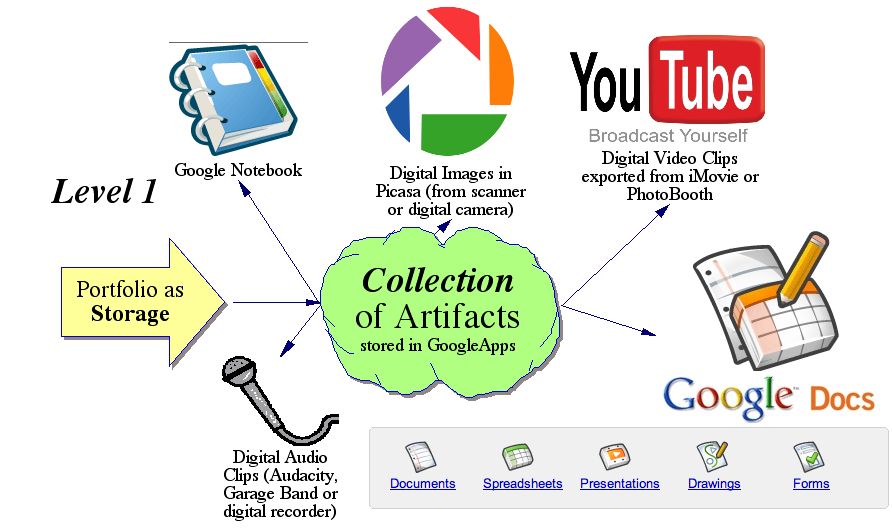
ePortfolio building has to do with the personal preference of depicting either a Workspace or a Showcase; Both teachers and student should have digital artifacts of  Progress and Product. However, certain platforms do provide specific services that may appeal to you depending on your expectations surrounding site visuals, social media presence, SEO preferences, and monetization requirements. Instructional technologist,  gives us a glimpse of just some of these companies in his presentation through the use of a cartoon:


However, Helen C. Barrett also suggests that there are two distinct levels of a portfolio:


The simplest examples of ePortfolios include the collection of various artifacts teachers and students may have stored to their GoogleApps, Youtube channel, MSOffice suite, or Cloud that demonstrates the quality and content of their work in specific contexts.

In more complex ePortfolios, a collection of artifacts is connected to various documentations of learning scenarios which teachers and students have experienced, created, or collaborated in as part of their own personal learning environment.


Ultimately, as Dr. Mary Dziorny suggests, ePortfolios are most beneficial when traced in a "lifelong" or "lifewide" manner. By creating a sophisticated archive of digital footprints from educational and professional experiences 
informed by peers and mentors, students can and teachers can both gain new career references and opportunities .

Sunday, November 13, 2016

Blogs and their Potential Impact

Most of us regularly interact with social media in some way or another. We hold Twitter accounts, Facebook pages, and garner Instagram likes. However, the “blog,” for all its interconnectedness, may still remain a mystery to some of us educators.

So, what exactly constitutes a blog?

In form, blogs differ from discussion boards and a typical web pages in that they follow the editorial format. According to Dictionary.com, editorials consist of:
an article in a newspaper or other periodical or on a website presenting the opinion of the publisher,writer or editor. (2016).
Similarly serialized (in a digital format), blogs feature opinion pieces by an individual or group of editors and contributors. Variations on the blog format include (but are not limited to) glogs (“multimedia interactive posters”) and vlogs (blogs presented in video format).
Primary affordances of various blog hosting sites include the integration of social media, digital multimedia (video, images, live streaming, etc), mobile/remote access, networking opportunities, and resource linking. Depending on the blog site you use or choose to associate your personal webpage with, the services available to you may differ. Matt Banner, a blogger backed by Forbes and Entrepreneur, has created this infographic to assist you in you selecting a blog hosting site based on those features. As for myself, I've found Wix and Wordpress to be the most intuitive sites in terms of networking and design opportunities.


blog site comparison

But how can we harness the power of blogs in the classroom? And are they really legitimate learning tools?

Blogs provide a powerful platform for observing a wide range of student work. One excellent example that comes to mind especially for High School students, would be to create a digital reading journal in blog format. However, instead of simply uploading a lesson template here, I'll be using the TPACK Model to identify each aspect of this suggested activity in order to assert the legitimacy of the blog as a tool for educators worldwide.

Reading Journal Blog

Content — In having students write their final draft of their reading journals in an individual blog format, they will be participating in the synthesis step of Blooms Revised Taxonomy. Students will create, design, and develop a holistic piece of work that categorizes and collects their individual writing entries. Before publishing their work students will write, revise, rearrange, and assemble their sites for their classmates, a specific blog reader community, and the general public.

Pedagogy — This approach is very loosely based on my own experiences using digital devices and software as well as the Reader's Theatre scaffold (as discussed by Dr. McCloud). In my own education, very seldom was I able to engage with texts and information on an equal level with my teachers. Even my English teachers disrupted my agency over my own learning by performing seemingly helpful tasks such as reading the selected books of our class aloud. However, in my Computer Skills courses (a requirement for graduation at my California-based high school) I was consistently empowered in that, often, even if I did not understand the particular details of an assignment, I was much more familiar with the physical presence of, and software on, those computers than my teachers. Thus, the presence of relatively new and developing technologies within classrooms proved a way to transform young students into immediate experts and equals when compared to their teacher's relative skill. Similarly, the use of blog technologies upholds this process which is so central to the oft-sought pedagogical stance of Paulo Freire's ideologies in increasingly modernized classrooms.

Technology — Fundamentally, this blog exercise adapts traditional reading journals from the technological Ages of Message Design (where content and form are the primary focus) into the Age of Learning Environments (ALE). This new process emphasis does not discard the traditional elements of content and form, however, ALE design incorporates personal/social interaction (e.g: social media, comment posting, self-publication) and highly developed environmental affordances (e.g: live digital formats). 


Simply put, the aforementioned affordances of social media integration, digital multimedia (video, images, live streaming, etc), mobile/remote access, networking opportunities, and resource linking within the blogger's world are skills many students are adept at. However, many may not have endeavored within these environmental elements for the purposes of scholarly work. Ultimately, this new application process links the student deeply and personally to their intended object of study in a novel and familiar way. Moreover, blogs may be used in classroom settings as a way to introduce other important communicative and networking skills that will be invaluable to students in the future (see: social media marketing, “netiquette”, etc). 


What are the projected advantages and disadvantages of this technology? 

Although, some might argue that students who are economically disadvantaged and/or residing in rural populations may have limited access to the “advanced” platforms suggested here: in my own research and personal experience, I have found the overwhelming majority of students have daily (if not constant) access to blog-ready devices (e.g: tablets, smartphones, computers, or laptops). Moreover, public libraries and schools themselves often offer computer services for little to no expense on the part of the student. Ultimately, there are two major benefits in the integration of blogs and similar digital technologies within the classroom. As Dr. McCloud suggests, student experience gain and comprehension could meet or exceed standards within a significantly reduced time. And, perhaps even more importantly, lesson plans centered around teaching technologies such as as these are not only intuitive to students, but they inspire pupils to take pride in content beyond the established (often narrow) structure of course objectives.


“Liberating education consists in acts of cognition, not transferals of information.”

                                 ― Paulo Freire